Weather Trip
- 4.2
- Rating
- 1.00M
- Installs
- Free
- Price
 Analysis by App-foxy
I spent time with Weather Trip as a straightforward weather app, and my first impression is that it aims to keep the daily forecast experience simple while also covering severe conditions. That combination matters because many people want more than a temperature number, but do not necessarily want a complicated weather dashboard filled with layers, charts, and technical terminology.
The app is developed by PJW FAMILY PROPERTY LLP and sits in the weather category. It is free to use, carries an Everyone age rating, and supports Android devices running version 6.0 or later. Its current version is 1.2.0, while its release date is August 14, 2025. Those details place it firmly in the accessible, everyday-use part of the market rather than the specialist forecasting space.
Weather Trip review: useful daily information without a paid barrier
I’ll focus on the practical questions that can shape a first impression: what to check when the app seems unclear, how to make a useful weather-checking routine, and when another source may be more appropriate. I’d treat the first few checks as a chance to learn whether Weather Trip’s concise approach suits the decisions you actually make, rather than expecting one glance to answer every planning question.
You May Also Like

 Blood Strike: 2.5 Anniversary
Blood Strike’s Loadouts Turn Every Drop Into a Tactical Gamble
A close look at Blood Strike’s custom loadouts: how fast access to signature weapons reshapes its battle royale rhythm, rewards preparation, and narrows the gap between fights.

 Pandora - Music & Podcasts
Pandora’s Music Is Easy to Start, but Harder to Recover
Pandora’s strength is its low-effort path from a seed to a station. Its weak spot is how much confidence it asks you to place in connection, setup, and quiet recovery.

 8 Ball Pool
 Is Built on Rivalries, Rematches, and Routine
A close look at the rivalries, rematches, shared routines, and unanswered safety questions that turn a quick pool match into a persistent mobile community.

 Samsung Music
’s Quiet Strength Is Playing What You Already Own
Its reach comes less from spectacle than from dependable access to a personal library. That simplicity is both the app’s strongest retention engine and its ceiling.

 AccuWeather: Weather Radar
AccuWeather Review: A Quick, Clear Forecast for Everyday Decisions
For everyday plans, the best forecast is the one you can understand quickly. AccuWeather makes rain timing, radar, and local conditions easy to act on, with a few trade-offs.

 Hill Climb Racing
Why Hill Climb Racing Still Turns Crashes Into One More Run
A tiny car, a bumpy hill and one more upgrade: Hill Climb Racing keeps resurfacing because its simple chaos makes every near-miss feel personal.
More From Our News Desk



What the free download actually means
The most important value point is easy to understand: Weather Trip is available at no cost. That makes it simple to try for a commute, a weekend plan, or a period of unsettled weather without committing money first. I appreciate that distinction because a weather app is often something people open briefly, then leave alone for hours. A free option has to earn its place through convenience rather than through a large upfront purchase.
I would still separate “free to download” from “automatically better value than every alternative.” The confirmed price is free, but that alone does not tell me whether every possible feature is included, whether the app contains advertising, or whether any optional extras exist. I would check the current app-store screen before making assumptions about those details. What can be said confidently is that the basic decision to install it does not require a purchase.
The app has passed the early discovery stage with over 500 thousand installs, alongside a 4.6 average from around 1.1 thousand ratings. That is a useful sign of public interest, although I would not treat popularity as proof that its forecast style will suit everyone. Weather preferences are personal: one user may want a clean glance, while another may expect radar, long-range comparisons, or highly detailed storm information.
How it fits into an ordinary day
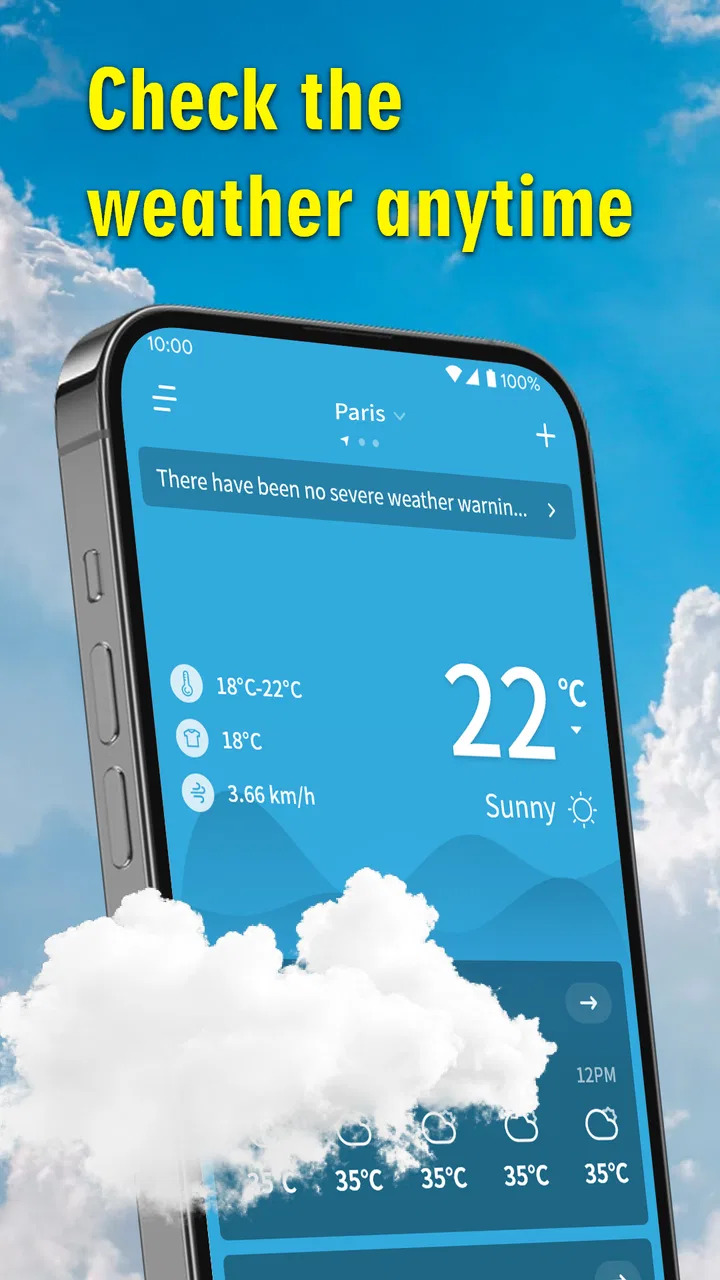
For me, the strongest use case is the quick decision before leaving home. Imagine checking the forecast while preparing for work, school, or a short trip. You want to know whether the day looks manageable and whether changing conditions deserve extra attention. Weather Trip’s focus on real-time weather and extreme weather makes that kind of check more relevant than an app that only presents a static daily temperature.
A useful habit is to open it at two different moments rather than relying on one glance. I would check once before making plans and again shortly before leaving, especially when the day looks unstable. This is not because any weather app can remove uncertainty; it is because current conditions and severe-weather information answer different questions. One tells me what is happening now, while the other helps me decide whether the plan itself needs adjusting.
That workflow is particularly practical for people who walk, cycle, drive, work outdoors, or care for children. A short trip can become uncomfortable or unsafe when conditions change quickly. The app’s emphasis gives it a clearer purpose than simply displaying a decorative weather background. It is most useful when weather information changes an action: carrying an extra layer, postponing a walk, allowing more travel time, or choosing an indoor alternative.
What the app does well for casual users
Weather Trip feels best suited to readers who want a weather tool they can understand quickly. The Everyone rating and broad Android compatibility support that impression. It is not positioned as an app only for experienced weather watchers, and I would recommend it first to someone who wants a practical companion for everyday decisions rather than a technical forecasting workstation.
Another strength is the balance between ordinary weather and extreme conditions. Many casual apps are pleasant for checking sunshine or rain but become less useful when the situation becomes more serious. Here, severe weather is part of the app’s stated purpose, so it has a reason to remain installed beyond the daily temperature check. That gives the free download more practical value than a novelty weather widget that is rarely opened after the first week.
I also like the possibility of using it as a second opinion. Even if a user already relies on the phone’s built-in weather service, a separate app can be useful when planning a day around conditions. The trade-off is that two services may present information differently, so I would avoid treating a disagreement as an automatic error. For important outdoor plans, I would look for consistent signals across updates instead of making a major decision from a single number.
Where the trade-offs become important
The main limitation is the amount of detail a reader can safely expect from the short description. Weather Trip clearly covers current weather and extreme weather, but that does not establish a particular set of advanced tools. I would not install it expecting specialist features such as a professional meteorological workstation, detailed historical analysis, or a full planning suite unless those capabilities are clearly shown in the current app experience.
This matters because weather apps are often compared by features that are easy to overlook. A person who needs minute-by-minute precipitation guidance, detailed radar interpretation, marine information, aviation data, or highly customizable alerts may be better served by a specialist alternative. Those users are not looking for the same thing as someone who simply wants a fast, readable update.
There is also a trade-off between simplicity and control. A focused app can reduce the time needed to understand the screen, but it may feel restrictive to someone who wants to rearrange every panel or compare multiple locations in depth. I would choose Weather Trip when the goal is quick awareness. I would skip it if my weather routine depends on building a detailed personal dashboard.
Its relatively recent release also affects how I judge it. A newer app can feel fresh and focused, but it may not yet have the long history or mature ecosystem associated with older weather services. That is not a criticism of the developer, PJW FAMILY PROPERTY LLP; it is simply a reason to pay attention to how well the app fits your own routine after several days rather than deciding from one opening.
Three practical ways to get more from it
First, I would use the app as a decision checkpoint, not as background decoration. Before leaving for an outdoor appointment, check the current conditions and then review the extreme-weather information. The useful insight is the connection between the two: ordinary conditions may look acceptable while a wider severe-weather situation makes the timing less comfortable. That approach turns a quick forecast into a small planning routine.
Second, I would compare the app’s information with the actual sky and local surroundings during the first few uses. Weather information is most valuable when it helps you understand your area, not when it encourages blind confidence. If the app makes you notice that conditions shift faster than expected in your neighborhood, you can build a better habit of checking shortly before travel instead of depending only on an early-morning forecast.
Third, I would keep the app for situations where weather has a direct cost in time or comfort. A cyclist deciding whether to take a longer route, a parent planning a playground visit, or a driver preparing for a road trip can all use a current update differently. That is a more effective role than opening it repeatedly without a question in mind. The app’s value comes from translating weather information into a choice.
A fourth useful trade-off is to use a second service only when the plan deserves extra confidence. For a normal walk, Weather Trip may be enough. For a long hike, a flight, a boat trip, or work in exposed conditions, I would not rely on a general-purpose app alone. That is not a weakness unique to this product; it is a sensible boundary for any everyday weather application.
Who is likely to appreciate it most
I think Weather Trip is a good match for Android users who want a free weather app with an emphasis on current conditions and severe weather. It should appeal to people who prefer a direct experience and do not want to pay before discovering whether an app fits their habits. It is also a reasonable choice for families, commuters, students, and casual travelers who need weather awareness without turning every forecast into a research project.
The broad device support is helpful for people using older Android hardware, since the minimum requirement is Android 6.0. That does not guarantee identical performance on every phone, but it does make the app accessible to a wider range of users than products limited to newer operating-system versions. If your phone meets that requirement, trying the app is a low-risk way to see whether its presentation suits you.
I would be more cautious about recommending it to professional users or anyone whose safety depends on highly specialized weather interpretation. A construction supervisor, mountain guide, sailor, or storm enthusiast may need tools designed around their exact environment and decisions. In those cases, Weather Trip could still serve as a convenient general check, but I would not make it the only source of information.
How it compares with familiar alternatives
The most obvious alternative is the weather service already built into an Android phone. That option usually wins on convenience because it is already present and may be integrated into the home screen. Weather Trip has a clearer reason to compete when the user specifically wants an app centered on real-time conditions and extreme-weather awareness rather than simply accepting the default forecast.
Another alternative is a feature-heavy weather platform. Those apps can be better for people who want radar layers, extensive charts, multiple data views, or detailed location management. Their advantage is depth; their disadvantage is that the screen can take longer to interpret. Weather Trip makes more sense when I value a focused check over a large collection of controls.
There are also notification-first weather tools, which are useful for people who want warnings to arrive without opening an app. Weather Trip’s stated focus does not, by itself, establish a particular notification system, so I would not choose it solely for that purpose without checking how the current version handles alerts. If automatic warnings are the deciding factor, that should be tested directly after installation.
In other words, Weather Trip is not automatically the winner in every comparison. Its strongest position is as a free, approachable option for current weather and severe-weather awareness. It becomes less compelling when a user needs professional depth, extensive customization, or a proven specialist workflow.
My verdict on value
After weighing the free access against the trade-offs, I see Weather Trip as a sensible app to try rather than a product I would recommend blindly to every weather enthusiast. There is no purchase barrier, the age rating keeps it broadly approachable, and its focus gives it a practical role in daily planning. The 4.6 average and over 500 thousand installs suggest that many people have found it worth keeping, while the number of reviews remains modest enough that I would still judge it personally rather than relying only on the score.
My recommendation is simple: install it if you want an uncomplicated weather check that also takes extreme conditions seriously. Give it several days and use it before real plans, not just during idle browsing. Pay attention to whether the information arrives in a form you can act on quickly and whether it covers the locations and level of detail you actually need.
Weather Trip is best viewed as a free everyday weather companion, not a replacement for specialist forecasting tools. I would keep it for commuting, family plans, short trips, and routine outdoor decisions. I would skip it, or pair it with a more advanced service, if my activities demanded professional-grade detail or highly specific alerts. For the right user, that focused role is exactly where its value lies.
FAQs for Weather Trip
01What is Weather Trip and how does it work?
Weather Trip is a comprehensive weather app designed to provide real-time weather updates, forecasts, and travel-related weather insights. The app uses GPS to determine your location and delivers personalized weather information, including temperature, humidity, wind speed, and precipitation forecasts. It also offers travel recommendations based on weather conditions, helping users plan their trips effectively.
02Is Weather Trip free to use, or does it require a subscription?
Weather Trip offers a free version with basic features, such as daily weather updates and forecast information. However, for access to premium features like advanced travel recommendations, extended forecasts, and ad-free usage, users can opt for a subscription model. The subscription is reasonably priced and can be purchased on a monthly or yearly basis.
03What platforms is Weather Trip available on?
Weather Trip is available for both Android and iOS devices. You can download it from the Google Play Store for Android users and the Apple App Store for iOS users. The app is optimized for a wide range of devices, ensuring a seamless user experience regardless of the platform you choose.
04Does Weather Trip require an internet connection to function?
Yes, Weather Trip requires an internet connection to provide real-time weather updates and forecasts. While some basic features may be accessible offline, such as previously viewed weather conditions, the app's full functionality, including live updates and travel recommendations, is dependent on an active internet connection.
05How accurate are the weather forecasts provided by Weather Trip?
Weather Trip utilizes sophisticated weather prediction models and data from reliable meteorological sources to ensure high accuracy in its forecasts. While no weather app can guarantee 100% accuracy due to the nature of weather systems, Weather Trip is designed to deliver precise and timely updates, helping users make informed decisions about their travel plans.
Pros
- User-friendly interface with intuitive navigation.
- Accurate and up-to-date weather forecasts.
- Customizable alerts for severe weather conditions.
- Integration with travel itinerary for trip planning.
- Offline mode available for remote areas.
Cons
- Occasional ads can interrupt user experience.
- Requires internet for real-time updates.
- Limited customization for weather widgets.
- Some features locked behind a paywall.
- Battery consumption can be relatively high.

Weather Trip
Gallery